The Digest Race Sheets Core Features
Choose a path below. Start with the basics if you are new to the Digest, or switch to the second path to see how the Race Sheet’s ratings, analysis, class tools, pace projections, trainer stats, comments, and data lines work together.
Learn the Digest Race Sheets
Get More From the Digest Race Sheet
Overview
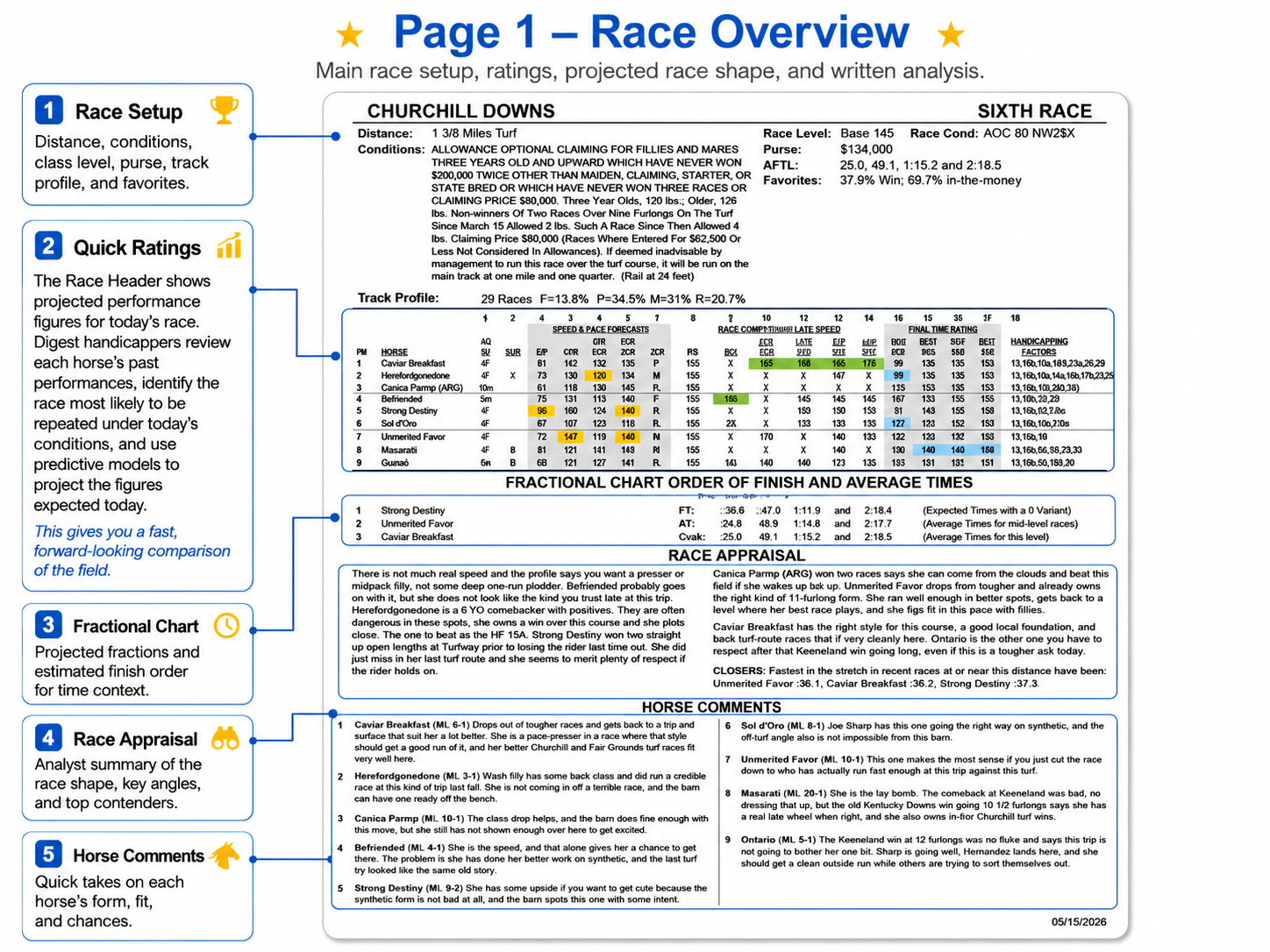


Race Setup
Interactive Race Sheet Tutorial
Race Setup
Start here to understand the race before comparing the horses. The blue hotspots explain the basic race information, including the field, distance, surface, race conditions, class level, purse, track profile, favorite trends, and projected race shape.
Roll over or tap each blue hotspot on the Race Sheet to learn what that item means and how it helps you understand today’s race.
 Race Setup Hotspots

Distance: Shows how far today’s race will be run. Some horses are better sprinting, while others need longer races. If this was a turf race, we’d also note that here.
Tip: Compare this with BST DIST, PER, and Track Profile.
Race Conditions: Describes the type of race being run and the eligibility rules for the horses entered.
Tip: Use this with Race Level to understand how tough today’s assignment is.
Race Conditions: This is the abbreviated version of the race conditions. It gives experienced users a faster way to identify the race type.
Tip: Use the full Race Conditions text when the abbreviation is unfamiliar.
Track Profile: Shows which running styles have been winning at this distance, such as frontrunners, pressers, midpack runners, or late runners.
Tip: Compare this with each horse’s PER running style in column 7.
Race Level: Shows the class strength of today’s race using the Digest’s Race Competition Level system. Higher numbers mean tougher races.
Tip: Compare today’s Race Level with each horse’s RRL, RCL, PST CLS, and AVG RCL.
Purse – Shows the total prize money available in the race. Larger purses often indicate stronger or more important races.
Tip: Use purse as context, but rely more on Race Level when judging class.
AFTL: Stands for Average For The Level. These are par times for this class of race under normal conditions.
Tip: Use AFTL as a benchmark for whether horses have run fast enough for this level.
Favorites: Shows how often favorites have won or finished in the money under similar race conditions.
Tip: If favorites perform poorly in this type of race, be more open to alternatives.
Post Position Order
Horses are listed in post-position order when the Race Sheet is produced. This is not always the final betting or program number.
Tip: Always confirm the final program number before placing a wager, especially because Race Sheets are produced several days before post time.
Horse
This is the horse’s name. Each row belongs to one horse, and the ratings across that row apply to that horse.
Tip: Read across the row to compare that horse’s speed, class, running style, equipment, and Handicapping Factors.
Age/Sex
Shows the horse’s age and sex, such as colt, gelding, filly, mare, horse, or ridgling.
Tip: Age and sex can affect how a horse fits today’s race, especially when younger horses face older horses or females face males.
Equipment
Shows equipment or race-day designations for the horse, such as blinkers, front wraps, four wraps, Lasix, shadow roll, or claimed-out notation.
Tip: Equipment can help explain changes in focus, running style, soundness concerns, or race-day setup. Pay extra attention when equipment changes from one race to the next.
ET — Expected Times
ET shows the projected times today’s field is expected to run at key points in the race, based on the Digest’s Fractional Charting.
Tip: Compare the ET line with AFTL to see whether today’s field projects faster or slower than the average times for this race level.
AT — Average Times
AT shows the average times for mid-level races at today’s distance and surface.
Tip: Compare AT with ET and AFTL. ET shows what today’s field is projected to run, while AFTL shows the average times for today’s race level.
AFTL — Average For The Level
AFTL shows the average times for today’s specific race level. It acts like a par-time benchmark for the class of horses running in this race.
Tip: Compare AFTL with ET. If ET is faster than AFTL, today’s field projects strong for the level. If ET is slower, the race may be softer or less predictable.
Go Deeper: How to Use Race Setup
The hotspots above give quick definitions for each Race Setup item. The sections below explain how those items work together so you can understand the race before comparing individual horses.
Start with the race conditions, distance, surface, class level, and expected race shape. Then use the horse-by-horse ratings and comments to decide which horses fit today’s assignment.
The goal is simple: understand the race first, then evaluate the horses.
Quick Ratings
Interactive Race Sheet Tutorial
Quick Ratings
Use this section to quickly compare the most important ratings for each horse in today’s race. The Quick Ratings summarize projected speed, pace, class fit, final-time ability, and key handicapping angles in one compact row.
Many of these numbers are forward-looking. Digest handicappers review each horse’s past performances, identify the race most likely to be repeated under today’s conditions, and use predictive models to project how the horse is expected to perform today.
Roll over or tap the colored hotspots to learn what each rating means. Use the color key below to separate projected speed and pace, race competition levels, proven final-time ratings, and Digest Handicapping Factors.
 Speed & Pace Forecasts
 Race Competition Levels
Final Time Ratings
Race Competition Levels
Final Time Ratings
 Handicapping Factors
FIRE Number
Unlike speed figures that focus only on final time, the FIRE Number is based on the horse’s speed throughout the entire race. In the Race Header, we show the FIRE Number we expect the horse to earn in today’s race, giving you a fuller view of its projected overall performance and making it easier to compare contenders.
FIRE is based on a 100 par, while many of the Digest’s other figures are based on a 150 par.
Tip: Higher is better. About two FIRE points equals roughly one length.
CPR — Comprehensive Performance Rating
CPR is a Digest performance rating that takes pace, final time, closing strength, and track variant into account. In the Race Header, we show the CPR we expect the horse to earn in today’s race.
Tip: Higher is better. Use CPR with FIRE and Fast Fig to see which horses are competitive across more than one rating.
Fast Fig
Fast Fig is an AI-driven performance figure that combines speed, pace, and strength of field into one number. In the Race Header, we show the Fast Fig we expect the horse to earn in today’s race.
Tip: Higher is better. Horses within five points of the top Fast Fig should usually be considered contenders.
FNL RAT — Final Time Rating
The Final Time Rating measures a horse’s final time against the Digest’s track pars, with the daily track variant factored in. A horse equaling the track par for the distance would earn a 150 Final Time Rating, with three points deducted for each length slower than par.
Tip: Higher is better. Use FNL RAT to compare how strongly each horse is expected to finish in today’s race.
PER — Performance Early in Race
PER shows the horse’s expected running style in the early part of today’s race: F = Frontrunner, P = Pace Presser, M = Mid-pack runner, and R = Rear runner / late runner.
Tip: Compare PER with the Track Profile to see whether today’s race setup may favor that horse’s running style.

RRL — Recent Race Level
RRL shows the Race Competition Level of the horse’s last race. It helps you see the class level the horse most recently competed against.
Tip: Compare RRL to today’s Race Level. If today’s Race Level is higher, the horse is moving up in class. If it is lower, the horse may be dropping into easier company.
RCL — Race Competition Level
RCL shows the highest class level where the horse has been competitive locally within the last 90 days. It helps you judge whether the horse has recently proven it can compete near today’s level.
Tip: Compare RCL to today’s Race Level. A horse with an RCL close to or above today’s Race Level usually fits the class of the race better.
BST SUR — Best Surface Class Rating
BST SUR shows the highest Race Competition Level where the horse has been competitive on today’s surface, such as dirt, turf, or synthetic, within the past six months.
Tip: Compare BST SUR to today’s Race Level. A strong number means the horse has already shown it can handle this surface at or near today’s class level.
BST DST — Best Distance Class Rating
BST DST shows the highest Race Competition Level where the horse has been competitive at today’s distance type, such as a sprint or route, within the past six months.
Tip: Compare BST DST to today’s Race Level. A strong number means the horse has already shown it can handle this type of distance at or near today’s class level.
PST CLS — Past Class
PST CLS shows the highest Race Competition Level where the horse has been effective in the past. It helps identify horses that may have handled stronger company before, even if their recent races are at a lower level.
Tip: Strong past class matters most when the horse also shows signs of current form or improvement.
AVG RCL — Average Race Competition Level
AVG RCL shows the horse’s average recent Race Competition Level in races where it was competitive. It is based on qualifying races from the past six months.
Tip: Compare AVG RCL to today’s Race Level. A horse with an AVG RCL close to today’s Race Level has shown it can compete around this class level more than once.
LST RAT — Last Race Final Time Rating
LST RAT shows the Final Time Rating the horse earned in its last start. It gives you a quick look at how strongly the horse finished in its most recent race.
Tip: Higher is better. A strong LST RAT is most useful when today’s race is similar in distance, surface, and class.
BST RAT — Best Final Time Rating
BST RAT shows the highest Final Time Rating the horse has earned in its lifetime. It gives you a quick look at the horse’s best proven final-time performance.
Tip: A strong BST RAT shows upside, but current form still matters. Use it with LST RAT to see whether the horse is still running near its best.
BST SUR — Best Surface Rating
BST SUR shows the best Final Time Rating the horse has earned on today’s surface, such as dirt, turf, or synthetic.
Tip: Surface matters. A strong BST SUR is more useful when today’s race is on the same surface where the horse has already run well.
BST DIST — Best Distance Rating
BST DIST shows the best Final Time Rating the horse has earned at today’s distance type, such as a sprint or route.
Tip: Use BST DIST to see whether the horse has already shown finishing ability at a similar distance. A strong rating helps confirm that today’s trip fits.
Handicapping Factors (HF’s)
Handicapping Factors are Digest specific short codes used to point out important angles, clues, and potential concerns for each horse. They can flag things like class changes, equipment changes, layoffs, pace issues, trouble, improving form, longshot potential, or whether a horse fits today’s race.
Tip: Use Handicapping Factors as quick clues, not automatic picks. The strongest cases usually combine positive HF codes with competitive ratings, class fit, and good current form.
Quick Ratings: Learn What Each Number Means
The guide below explains what each colored hotspot group means and how the Quick Ratings help compare projected speed, class fit, final-time strength, and key handicapping angles.
How to Read the Colored Hotspots
Speed & Pace Forecasts
Race Competition Levels
Final Time Ratings
Handicapping Factors
Each hotspot color represents a different type of Quick Rating. Use this legend first, then click or tap the colored icons on the Race Sheet to learn what each rating means.
Go Deeper: How to Use the Quick Ratings
The color guide above gives you the basic purpose of each Quick Ratings group. The sections below explain how those ratings work in more detail and how to apply them when comparing horses.
Use the hotspots for quick definitions while looking at the Race Sheet. Then use the expandable sections below to understand the bigger handicapping picture: which horses project fastest, which ones fit today’s class, who has proven final-time ability, and which Handicapping Factors may confirm or challenge your opinion.
Start with the group that matches the question you are trying to answer.
Analysis & Comments
Interactive Race Sheet Tutorial
Analysis & Comments
Use this section to understand the handicapper’s written view of the race. The blue hotspots explain the Race Appraisal and Horse Comments, including pace clues, trip notes, class context, form analysis, contender opinions, and possible value plays.
Roll over or tap each blue hotspot on the Race Sheet to learn how the analysis and comments help explain what the ratings may not show by themselves.
Analysis & Comments Hotspots
Race Appraisal
The Race Appraisal is the handicapper’s overview of how today’s race may unfold. It can explain pace, class, figure strength, vulnerable favorites, value horses, and which runners appear most likely to contend.
Tip: Read this after reviewing Race Setup and Quick Ratings. It helps connect the numbers to today’s actual race conditions.
Pace & Race Flow
This part of the analysis explains how the race may be run. It can point out early speed, pace pressure, lone-speed possibilities, closers, or horses that may benefit from the expected setup.
Tip: Compare this with PER, Track Profile, ET, and each horse’s running style.
Class & Figure Context
This part of the analysis explains whether the ratings fit today’s race. A horse may have strong numbers, but those numbers matter more when they were earned under similar class, distance, surface, and pace conditions.
Tip: Use this with Race Level, RCL, Fast Fig, FIRE, CPR, and Final Time Ratings to judge whether a horse truly fits today’s race.
Horse Comments
Horse Comments give the handicapper’s individual view of each runner. They may explain form, class fit, distance or surface concerns, pace setup, trip trouble, equipment changes, workouts, or improvement potential.
Tip: Read across the horse’s row first, then use the comment to confirm, question, or better understand what the ratings show.
Closers
The Closers line highlights horses expected to finish strongly late. They may not show early speed, but they can become dangerous if the pace up front is fast, contested, or tiring.
Tip: Compare Closers with the Pace & Race Flow comments, PER running style, Track Profile, and ET. A closer is most useful when the race setup gives late runners a chance.
Value & Betting Clues
This part of the analysis may point out horses that offer value, longshot potential, exotic-wager use, or reasons a favorite may be vulnerable.
Tip: Value horses are strongest when the comment is supported by competitive ratings, class fit, favorable pace, or positive Handicapping Factors.
Go Deeper: How to Use Analysis & Comments
The hotspots above give quick definitions for the Race Appraisal and Horse Comments areas. The sections below explain how to use those written opinions with the ratings, class tools, pace clues, and race setup.
The goal is to understand not just which horses have strong numbers, but why those numbers matter in today’s race and whether the handicapper’s comments support or challenge what the figures show.
Use the ratings to find contenders, then use the analysis and comments to understand the story behind them.
Past Performances
Interactive Race Sheet Tutorial
Past Performances
Use this section to understand each horse’s recent race history and how those past efforts project into today’s race conditions. Unlike ordinary past performances, the Digest Data Lines translate each horse’s prior races into today’s context, adjusting for track, distance, surface, pars, and variants.
The colored hotspots organize the Past Performance area into four groups: race history and conditions, Digest projected performance ratings, class and race-strength clues, and workouts, records, and current-condition information.
Roll over or tap each colored hotspot to see how the Digest has already done the conversion work for you, helping you compare past races more directly and identify which efforts best predict today’s performance.
Race History & Conditions
Digest Performance Ratings
Class & Race Strength
Workouts, Records & Current Condition

Past Performance Data Lines
These are not ordinary past performances. The Digest translates each past race into today’s race context, adjusting the horse’s times for track, distance, surface, pars, and variants.
Tip: Instead of trying to manually compare different tracks, distances, and surfaces, use these Data Lines to see how each past race measures up under today’s conditions.
Track
Track shows where the horse ran that past race. This identifies the original racetrack before the Digest translates the performance into today’s race context.
Tip: The track tells you where the race came from, but you do not have to manually convert one track to another. The Digest adjusts the key performance data so different tracks can be compared more fairly in today’s terms.
Date & Race Number
Date & Race Number shows when the horse ran and which race number it was on that card. This helps you judge how recent the race was and locate the original race if needed.
Tip: Recent races usually tell you more about current form, but older races can still matter when the Digest’s adjusted data shows that the performance fits today’s conditions.
Distance & Surface
This shows the distance and surface of the original past race. The important Digest advantage is that the horse’s performance is adjusted so races from different distances and surfaces can be compared more fairly against today’s race.
Tip: You no longer have to guess how a six-furlong race, turf race, dirt race, or different-track effort compares. The Digest has already converted the key performance data for you.
TRNR/JCKY — Trainer & Jockey
TRNR/JCKY shows the trainer and jockey for that specific past race. This may be different from today’s trainer or jockey, especially if the horse has changed barns, changed riders, or moved to a different circuit.
Tip: Use this to understand the context of the past performance. A strong adjusted race line may be more meaningful if the horse returns with the same connections, while a trainer or rider change can signal a new setup today.
TKCD — Track Condition
TKCD shows the condition of the racing surface for that past race, such as fast, wet fast, good, muddy, sloppy, firm, yielding, soft, or heavy.
Tip: Track condition can change how a race plays. The Digest Data Lines already adjust the key performance data into today’s race context, but TKCD still helps explain whether the horse’s past effort came over a dry, wet, firm, or softer surface.
Race Type
Race Type identifies the general kind of race the horse ran in, such as maiden, claiming, allowance, optional claiming, stakes, handicap, or graded stakes.
Tip: Use Race Type as the first class clue. It tells you the broad category of the past race before you look at the more specific Race Conditions and RCL.
Race Conditions
Race Conditions show the specific details of that past race, such as non-winners conditions, claiming price, allowance restrictions, purse level, or stakes grade. Examples may include NW2, $100K, Gr2, maiden special weight, optional claiming details, or state-bred restrictions.
Tip: Use Race Conditions with RCL to judge how closely that past race matches today’s assignment. The Digest has already adjusted the performance data into today’s race context, but the conditions still help explain the quality and purpose of the race.
Finish Position & Beaten Lengths
This shows where the horse finished and how far it was beaten, or how far it won by. It gives the race result, but the result alone does not tell how the horse’s effort translates to today.
Tip: A finish position can be misleading. Use the adjusted times, CPR, Last Fraction, PAC RAT, FNL RAT, and Notes to understand the real strength of the performance.
Morning Line Odds
Morning Line Odds show the horse’s expected odds before betting began in that specific past race. In the Digest Data Lines, morning-line odds are usually shown with “ML” before the number, such as ML3.
Tip: Compare Morning Line Odds with Actual Odds. If the horse went off at much lower odds than the morning line, it may have attracted strong betting support. If it went off higher, the public was less interested than expected.
Actual Odds
Actual Odds show the horse’s final odds at post time for that specific past race. In the Digest Data Lines, actual odds are shown with an “A” before the number. For example, A7.7 means the horse went off at 7.7-to-1.
Tip: Compare Actual Odds with the Morning Line to see whether the horse was bet down, ignored, or supported about as expected.
Equipment
Equipment shows what equipment or race-day designations applied to the horse in that specific past race. This may include items such as blinkers, front wraps, Lasix, shadow roll, or other equipment notes.
Tip: Compare the equipment in the past performance with today’s equipment. A change can help explain a different running style, improved focus, added speed, or a possible physical concern.
Post Position, Field Size & Key Race Winners
This field shows the horse’s post position, field size, and how many horses from that race came back to win their next start. That can reveal when a past race was stronger than it first appeared.
Tip: A strong adjusted performance coming out of a productive key race can be especially meaningful.
Track Bias
Track Bias shows whether the track favored a certain path or running style in that past race, such as speed, closers, inside paths, or outside paths.
Tip: This helps explain the adjusted performance. Upgrade horses that ran well against a bias, and be careful with horses that were helped by one.
Track Variant
The Track Variant accounts for how fast or slow the racing surface was that day. This is one of the adjustments that helps translate a past race into today’s context.
Tip: Raw times can fool you. Variant-adjusted data helps make performances from different days and tracks easier to compare.
RCL — Race Competition Level
RCL shows the class strength of the past race using the Digest’s Race Competition Level system. Higher numbers mean stronger races.
Tip: Compare the past-race RCL to today’s Race Level. This helps you see whether the adjusted performance came against company that fits today’s class.
CPR — Comprehensive Performance Rating
CPR is one of the Digest’s core performance ratings. It combines important parts of the horse’s race, including pace, final time, last fraction, and track variant, into a broader performance number.
Tip: Because the Data Lines are adjusted to today’s context, CPR helps you compare how strong each past effort looks for today’s race.
Last 10 FIRE
Last 10 FIRE shows the horse’s recent FIRE numbers in order, giving you a quick view of its recent performance pattern.
Tip: Use this to spot trends. Rising FIRE numbers can point to improving form, while declining numbers may signal a horse going the wrong way.
Position at Each Call & Projected Times
This is one of the Digest’s most important Past Performance features. For each past race, the Digest projects the horse’s times at each point of call as if that race were being evaluated under today’s race conditions.
The line also shows the horse’s position in that past race at each projected call time, so you can see not only how fast the horse was running, but where it was during the race — on the lead, pressing, stalking, midpack, or closing.
Tip: This removes much of the guesswork from comparing races run at different tracks, distances, surfaces, and conditions. The conversion work has already been done, and the position-at-call data helps you understand how that performance would fit today’s expected race shape.
Last Fraction
Last Fraction shows how fast the horse finished the final part of the race. In the Digest Data Lines, this figure is adjusted for differences in track, distance, surface, pars, and variants.
Tip: This helps identify horses whose late kick may transfer to today’s race, especially when the pace setup gives late runners a chance.
PAC RAT
PAC RAT measures the horse’s pace strength through the early part of the race. It helps show how much early speed or pace pressure the horse produced in that past performance.
Tip: Use PAC RAT to identify horses that can make or press the pace. Because the Digest adjusts past-performance data into today’s race context, PAC RAT helps compare early-speed ability across different tracks, distances, and surfaces.
FNL RAT
FNL RAT measures the horse’s final-time performance after adjustment for the day’s track variant. It helps show how strong the overall race was once track speed is accounted for.
Tip: Use FNL RAT to judge how well a past race projects into today’s conditions. Strong recent FNL RAT numbers can point to current form, especially when earned at a similar class level or supported by CPR and Last Fraction.
Today’s Final
Today’s Final shows the final time that past performance projects to if the horse repeated that effort under today’s race conditions. It translates the past race into today’s distance, surface, track, and race setup.
Tip: Use Today’s Final to compare past races in today’s terms. Instead of trying to decide how a past race from a different track, distance, or surface should transfer, the Digest has already converted the performance so you can judge how strong it looks for today.
Notes
Notes explain important trip or trouble details from recent races, such as a slow start, wide trip, traffic, strong finish, tired finish, or other race events.
Tip: Use Notes with the adjusted Data Lines. A poor finish may be forgivable if the horse had trouble, while a good finish may be less impressive if the trip was perfect.
Course Record
Course Record shows the horse’s record at the track where today’s race is being run, under today’s general race conditions. The record is listed as starts, wins, places, and shows.
Tip: Use Course Record to see whether the horse has already proven it can handle this track, today’s surface, and today’s distance category, such as sprint or route. A strong course record can support the Digest’s adjusted past-performance projection.
Condition Record
Condition Record shows the horse’s record at all tracks under today’s general race conditions. The record is listed as starts, wins, places, and shows.
Tip: Use Condition Record to see whether the horse has handled today’s surface and distance category, such as sprint or route, even when those races were run at other tracks. This helps confirm whether the Digest’s adjusted past-performance projection is supported by proven experience under similar conditions.
Works — Recent Workouts
Works show the horse’s recent morning workouts, including the track, date, time, surface condition, and workout rank.
Tip: Workouts help judge current readiness. They are especially useful when paired with adjusted past-performance data, trainer stats, layoffs, and Horse Comments.
How to Read the Colored Hotspots
Race History & Conditions
Digest Projected Performance Data
Class & Race Strength
Workouts, Records & Current Condition
Each hotspot color represents a different type of Past Performance information. Use this legend first, then click or tap the colored icons on the Race Sheet to learn how the Digest translates past races into today’s race conditions.
Go Deeper: How to Use Past Performances
The colored hotspots above explain the major parts of the Past Performance section. The accordion sections below show how to use those details together to make better handicapping decisions.
Start with the original race context, then study the Digest’s projected performance data to see how each past race translates into today’s conditions. From there, use class, race strength, workouts, records, and notes to decide which past performances are most likely to matter today.
The goal is not to read every past race the same way. The goal is to find the past performance that best predicts what the horse can do today.
Connections
Interactive Race Sheet Tutorial
Connections
Use this section to understand the human and pedigree factors behind each horse. The Connections area shows who trains the horse, who rides the horse, how that trainer and jockey have performed together, which trainer angles apply to today’s race, and whether the horse’s breeding supports today’s distance, surface, or race conditions.
One of the Digest’s key advantages is that we do not overload you with generic trainer stats. Instead, we show trainer stats that are relevant to this horse’s situation today, such as class moves, layoff returns, second start after 90+ days, surface changes, distance changes, or today’s race type like turf route or dirt sprint.
Connections will not turn a poor horse into a strong contender by themselves, but they can help separate horses with similar ratings. A positive trainer move, strong trainer/jockey combination, or useful pedigree clue can support a horse that already fits the race on form, ability, class, and conditions.
Roll over or tap each colored hotspot to learn how trainer, jockey, relevant trainer stats, and breeding clues can help confirm whether a horse is well-meant, properly placed, and likely to handle today’s assignment.
Horse Identity & Basic Profile
Trainer & Jockey
Relevant Trainer Stats & Intent
Breeding & Pedigree Clues
Horse Name
This is the horse’s name. Each Data Box belongs to one horse, and the trainer, jockey, breeding, trainer stats, works, notes, and records shown in that box apply to that runner.
Tip: Start by identifying the horse, then read the Connections information to see whether today’s trainer, jockey, and pedigree clues support the horse’s chances.
Age / Sex
Age / Sex shows how old the horse is and whether it is a colt, gelding, filly, mare, horse, or ridgling. These details can matter because younger horses may still be developing, while older horses may be more established or declining.
Tip: Pay extra attention when younger horses face older horses, females face males, or a horse is newly gelded. Age and sex can affect how well a horse fits today’s class and conditions.
Trainer / Jockey Combination
This shows today’s trainer and today’s jockey, along with their recent record together. The record is shown as starts, wins, places, and shows.
The numbers after the trainer and jockey names show how often they have teamed up recently and how many times that partnership finished first, second, or third.
For example, 67 20-11-8 means 67 starts together, with 20 wins, 11 seconds, and 8 thirds. A high win rate or strong in-the-money record can suggest a productive partnership.
Tip: A strong trainer/jockey combination can be a positive sign, especially when the horse already has competitive ratings, class fit, and a race setup that makes sense.
Trainer Stats
Trainer Stats show the trainer angles that are relevant to today’s race. The Digest does not simply list generic trainer numbers; it highlights the trainer’s current form and the specific moves this horse is making today.
The format is usually percentage, starts, wins-places-shows. For example, (24.0%) 129 31-20-12 means the trainer won 24.0% from 129 starts, with 31 wins, 20 seconds, and 12 thirds.
Tip: Use these stats to judge trainer intent. If the horse is dropping in class, switching surfaces, stretching out, cutting back, returning from a layoff, or making another important move, the Digest shows the stat that matches that situation.
Last 15 Trainer Stat
Last 15 shows how the trainer has performed with their most recent 15 starters. It gives a quick snapshot of current barn form and is shown as win percentage, starts, then wins-places-shows.
Example: LAST 15: (6.7%) 15 1-1-1 means the trainer won with 6.7% of the last 15 starters, with 1 win, 1 second, and 1 third.
Tip: Use Last 15 to see whether the barn is currently hot, cold, or steady. It is a current-form clue, not a complete trainer profile.
Relevant Trainer Angle
Each trainer stat shown here applies to the horse’s situation in today’s race. For example, if the horse is dropping in class, returning for its second start after 90+ days, switching surfaces, stretching out, cutting back, or making another important move, the Digest shows that specific trainer stat.
Tip: This saves you from digging through broad trainer data. Focus on whether the trainer has succeeded with the exact type of move this horse is making today.
Race Condition Trainer Stat
This trainer stat shows how the trainer performs with horses running under today’s type of race condition, such as turf routes, dirt sprints, synthetic sprints, turf sprints, or dirt routes.
The format is win percentage, starts, wins-places-shows. For example, TURF RTE: (18.5%) 65 12-9-8 means the trainer won 18.5% from 65 turf-route starters, with 12 wins, 9 seconds, and 8 thirds.
Tip: Use this stat to see whether the trainer has proven success in the same kind of race the horse faces today. A strong condition-specific stat is more useful than a broad trainer average because it matches today’s surface and distance category.
Layoff Trainer Stat
This trainer stat shows how the trainer performs with horses returning from a layoff or break in racing, such as 30+ days, 90+ days, or longer. These stats help you judge whether the trainer is effective getting horses ready off the bench.
The format is win percentage, starts, wins-places-shows. For example, 90+: (17.8%) 209 36-28-30 means the trainer won 17.8% of the time with horses coming back from layoffs of 90 days or more, with 209 starts, 36 wins, 28 seconds, and 30 thirds.
Tip: Use this stat to decide whether a layoff horse is likely to be ready today. A strong layoff stat can support a horse returning from a break, while a weaker stat may suggest the horse could need a race.
Breeding Line
The breeding line shows the horse’s sire, dam, and dam’s sire. It helps identify pedigree clues that may point to surface preference, distance ability, wet-track ability, early speed, stamina, or improvement potential.
Tip: Breeding is most useful when the horse has limited experience under today’s conditions, such as first-time starters, surface changes, or horses trying a new distance.
Sire
The sire is the horse’s father. Sire information can help estimate whether the horse may handle turf, synthetic, mud, sprinting, routing, early speed, or stamina.
Tip: Sire clues are most useful when the horse has not yet proven itself under today’s conditions. Once a horse has enough race evidence, actual performance usually matters more than pedigree theory.
Sire Surface & Mud Percentages
The percentages after the sire show how that sire’s offspring have performed in specific categories, such as turf, synthetic, or mud. These can help suggest whether today’s surface or track condition may suit the horse.
Tip: Use these percentages as clues, not guarantees. A pedigree may suggest a horse can handle a surface, but the horse still has to prove it on the track.
Dam
The dam is the horse’s mother. The dam side of the pedigree can add clues about surface preference, stamina, class, and whether the horse may improve with age or distance.
Tip: The dam is especially useful when evaluating lightly raced horses, first-time starters, or horses trying something new today.
Dam’s Sire
The dam’s sire is the sire of the horse’s mother. This is often called the broodmare sire and can add important pedigree clues, especially for distance, turf, wet-track ability, or stamina.
Tip: Use the dam’s sire as a secondary breeding clue. It can help support or question whether the horse is likely to handle today’s race conditions.
How to Read the Colored Hotspots
Horse Identity & Basic Profile
Trainer & Jockey
Relevant Trainer Stats & Intent
Breeding & Pedigree Clues
Each hotspot color represents a different type of connection or pedigree information. Use this legend first, then click or tap the colored icons on the Race Sheet to learn how the horse’s human connections and breeding can support or weaken its case today.
Go Deeper: How to Use Connections
The colored hotspots above explain the main parts of the Connections section. The accordion sections below show how to use trainer, jockey, relevant trainer stats, and breeding clues as part of a complete handicapping process.
Connections are most useful after you have already reviewed the horse’s form, ability, class, pace, and race conditions. From there, the trainer, jockey, race-specific trainer stats, and pedigree clues can help confirm whether a horse is well-meant, properly placed, and likely to handle today’s assignment.
Use Connections to support a handicapping opinion, not to create one by itself.